
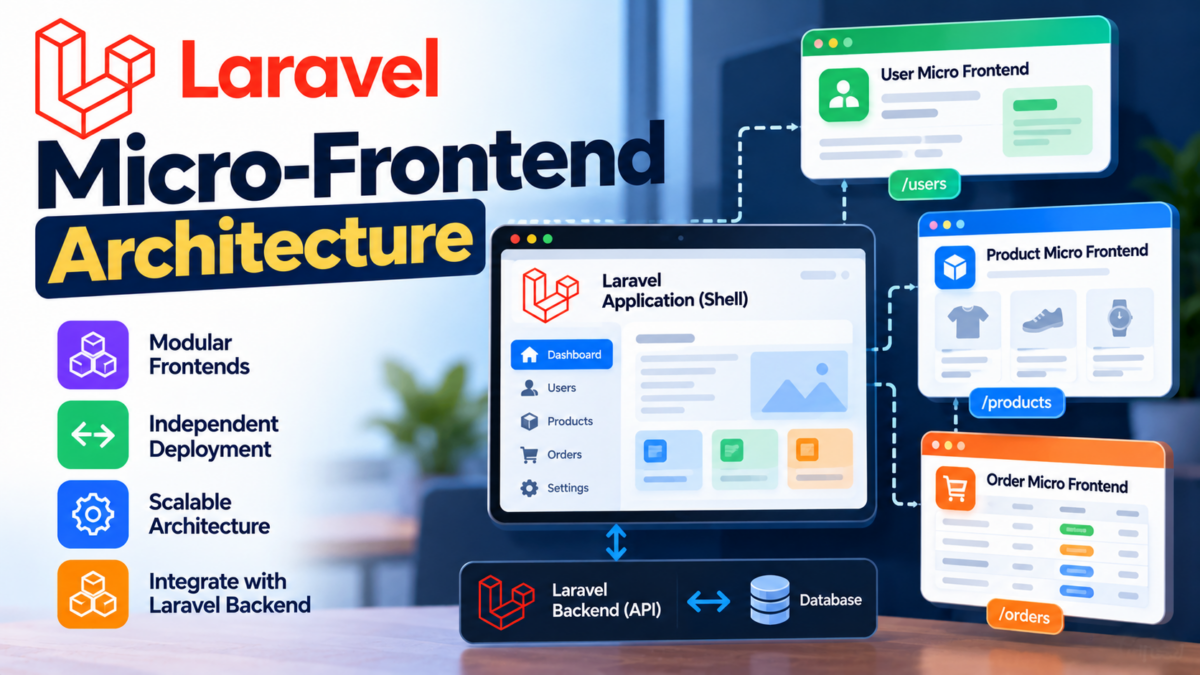
Modern web applications often start as unified monoliths, but as teams and feature sets grow, deploying small user-interface updates can require full-application rebuilds and risk taking down the entire site. Micro-frontends decompose frontend monoliths into independently deliverable, domain-driven user interface units.
When building a micro-frontend architecture with Laravel, each component functions as an autonomous service responsible for its own domain logic, data models, and API endpoints, while a shell application integrates them into a seamless user experience. This step-by-step guide walks you through identifying independent domains, building modular Laravel services, defining clean API contracts, communicating across services, containerizing environments with Docker, and deploying to production using Kubernetes Ingress.
Breaking Down Your Monolithic App: Identifying Independent Components
To build a sustainable micro-frontend architecture, begin by decomposing your monolithic application into distinct business subdomains.
In an e-commerce or SaaS platform, typical independent bounded contexts include:
- Catalog & Discovery: Product listings, full-text search, and category filtering.
- Cart & Checkout: Shopping bag state, order processing, and payment gateway webhooks.
- Account & Identity: User authentication, profile management, and notification settings.
Ask the following questions to validate component boundaries:
- Deployment Cadence: Does this feature change frequently enough to warrant independent deployments without re-testing other modules?
- Team Ownership: Can a dedicated team own this service end-to-end?
- Data Isolation: Does this service have its own distinct data storage requirements, or can it operate via API contracts?
Once these boundaries are identified, you can structure each service as an independent Laravel application within a monorepo or across separate repositories.
Setting Up a New Laravel Project for Each Micro-Frontend Component
Create an isolated directory structure for each micro-frontend service. In this example, we will set up a dedicated catalog service:
mkdir -p services/catalog
cd services/catalog
composer create-project laravel/laravel .
Configure the environment in services/catalog/.env:
APP_NAME=CatalogService
APP_ENV=local
APP_KEY=base64:...
APP_DEBUG=true
APP_URL=http://localhost:8001

DB_CONNECTION=mysql
DB_HOST=127.0.0.1
DB_PORT=3306
DB_DATABASE=catalog_service
DB_USERNAME=catalog_user
DB_PASSWORD=secret_password
Run database migrations to initialize the service database:
php artisan migrateRepeat this process for your other bounded contexts (e.g., services/checkout on port 8002 and a main shell frontend on port 8000).
Defining API Endpoints and Routing in Laravel
Micro-frontend components communicate with client shells and peer services using structured JSON APIs.
In Laravel 11, define your endpoints inside routes/api.php:
use App\Http\Controllers\Api\ProductController;
use Illuminate\Support\Facades\Route;

Route::prefix('v1')->group(function () {
    Route::get('/products', [ProductController::class, 'index'])->name('api.v1.products.index');
    Route::get('/products/{product}', [ProductController::class, 'show'])->name('api.v1.products.show');
});
Ensure CORS (Cross-Origin Resource Sharing) is configured so the host frontend shell can query these endpoints:
// config/cors.php
return [
    'paths' => ['api/*'],
    'allowed_methods' => ['*'],
    'allowed_origins' => ['http://localhost:8000', 'https://app.example.com'],
    'allowed_headers' => ['*'],
    'supports_credentials' => true,
];
Creating Models, Controllers, and Services for Independent Functionality
Each micro-frontend service encapsulates its own Eloquent models, controllers, and service layers.
1. The Eloquent Model
Create the Product model and migration:
php artisan make:model Product -mIn app/Models/Product.php:
namespace App\Models;

use Illuminate\Database\Eloquent\Factories\HasFactory;
use Illuminate\Database\Eloquent\Model;

class Product extends Model
{
    use HasFactory;

    protected $fillable = [
        'name',
        'slug',
        'description',
        'price_cents',
        'is_active',
    ];

    protected $casts = [
        'is_active' => 'boolean',
        'price_cents' => 'integer',
    ];
}
2. The API Resource & Controller
Use Laravel API Resources to guarantee stable JSON responses:
namespace App\Http\Resources;

use Illuminate\Http\Request;
use Illuminate\Http\Resources\Json\JsonResource;

class ProductResource extends JsonResource
{
    public function toArray(Request $request): array
    {
        return [
            'id' => $this->id,
            'name' => $this->name,
            'slug' => $this->slug,
            'price_formatted' => '$' . number_format($this->price_cents / 100, 2),
            'description' => $this->description,
        ];
    }
}
Implement the controller in app/Http/Controllers/Api/ProductController.php:
namespace App\Http\Controllers\Api;

use App\Http\Controllers\Controller;
use App\Http\Resources\ProductResource;
use App\Models\Product;
use Illuminate\Http\Resources\Json\AnonymousResourceCollection;

class ProductController extends Controller
{
    public function index(): AnonymousResourceCollection
    {
        $products = Product::where('is_active', true)->paginate(15);

        return ProductResource::collection($products);
    }
}
Implementing API Communication Between Micro-Frontend Components
When one micro-frontend component requires data from another (for example, the checkout component verifying product stock against the catalog service), communicate via resilient HTTP requests.
Create a dedicated client service using Laravel’s Http facade:
namespace App\Services;

use Illuminate\Http\Client\ConnectionException;
use Illuminate\Support\Facades\Http;
use Illuminate\Support\Facades\Log;

class CatalogClient
{
    public function __construct(
        protected string $baseUrl = 'http://catalog-service/api/v1'
    ) {}

    public function getProduct(int $productId): ?array
    {
        try {
            $response = Http::timeout(3)
                ->retry(2, 100)
                ->acceptJson()
                ->get("{$this->baseUrl}/products/{$productId}");

            if ($response->successful()) {
                return $response->json('data');
            }

            return null;
        } catch (ConnectionException $e) {
            Log::error('Catalog service unavailable', ['error' => $e->getMessage()]);
            return null;
        }
    }
}
This ensures timeouts and transient connection errors are logged without crashing dependent components.
Containerization with Docker for Isolated Development Environments
Containerizing your micro-frontend services ensures identical runtimes across development and production.
Create a root docker-compose.yml to orchestrate services:
services:
  shell-frontend:
    build:
      context: ./services/shell
    ports:
      - "8000:80"
    depends_on:
      - catalog-service
      - checkout-service

  catalog-service:
    build:
      context: ./services/catalog
    ports:
      - "8001:80"
    environment:
      - APP_ENV=local
      - DB_HOST=catalog-db
      - DB_DATABASE=catalog_db
      - DB_USERNAME=catalog_user
      - DB_PASSWORD=secret
    depends_on:
      - catalog-db

  catalog-db:
    image: mysql:8.0
    environment:
      MYSQL_DATABASE: catalog_db
      MYSQL_USER: catalog_user
      MYSQL_PASSWORD: secret
      MYSQL_ROOT_PASSWORD: root_secret
    volumes:
      - catalog_data:/var/lib/mysql

volumes:
  catalog_data:
Start all components simultaneously:
docker compose up -dDeploying Your Micro-Frontends to a Production Environment
In production, micro-frontends are packaged into Docker images via CI/CD and deployed to a container orchestrator such as Kubernetes.
1. GitLab CI Deployment Step
In .gitlab-ci.yml:
stages:
  - build
  - deploy

build-catalog:
  stage: build
  image: docker:24-cli
  services:
    - docker:24-dind
  script:
    - echo "$CI_REGISTRY_PASSWORD" | docker login $CI_REGISTRY -u $CI_REGISTRY_USER --password-stdin
    - docker build -t $CI_REGISTRY_IMAGE/catalog:$CI_COMMIT_SHA ./services/catalog
    - docker push $CI_REGISTRY_IMAGE/catalog:$CI_COMMIT_SHA
2. Kubernetes Ingress Routing
Route client requests through a single ingress domain using standard networking.k8s.io/v1 syntax:
apiVersion: networking.k8s.io/v1
kind: Ingress
metadata:
  name: micro-frontend-ingress
  annotations:
    kubernetes.io/ingress.class: nginx
spec:
  rules:
    - host: app.example.com
      http:
        paths:
          - path: /api/catalog
            pathType: Prefix
            backend:
              service:
                name: catalog-service
                port:
                  number: 80
          - path: /
            pathType: Prefix
            backend:
              service:
                name: shell-frontend-service
                port:
                  number: 80
With this routing in place, frontend requests to /api/catalog route directly to your catalog service, while base routes serve the client shell, creating a modular, resilient micro-frontend architecture.
Frequently Asked Questions
What is the benefit of breaking down a monolithic app into micro-frontends?
Breaking down a monolithic app into micro-frontends allows for independent development and testing of individual features, reducing the risk of affecting other parts of the application.
How do I identify potential candidates for decoupling in my existing app?
Identify features that rely on external services or APIs, can be reused across different parts of the application, or are critical components that affect overall performance.
What is the difference between a micro-frontend and a separate Laravel project?
A micro-frontend is an independent component within a larger application, whereas a separate Laravel project is a standalone instance of the framework for developing and testing individual features.
I’m getting errors when trying to containerize my components using Docker. What could be the issue?
Common issues when containerizing components include incorrect configuration, missing dependencies, or incompatible versions of Laravel. Ensure you have followed the official Docker documentation and checked your project’s requirements.
Why not use a full-fledged framework like React or Angular for building micro-frontends instead of Laravel?
While frameworks like React and Angular are suitable for complex front-end applications, Laravel is designed for building robust back-ends and APIs that can be consumed by micro-frontends. It provides the necessary tools for encapsulating models, controllers, and services within each component.